
Market vs Limit Orders on Hyperliquid: Which One You Click First
Market or limit order on Hyperliquid — which should you click?
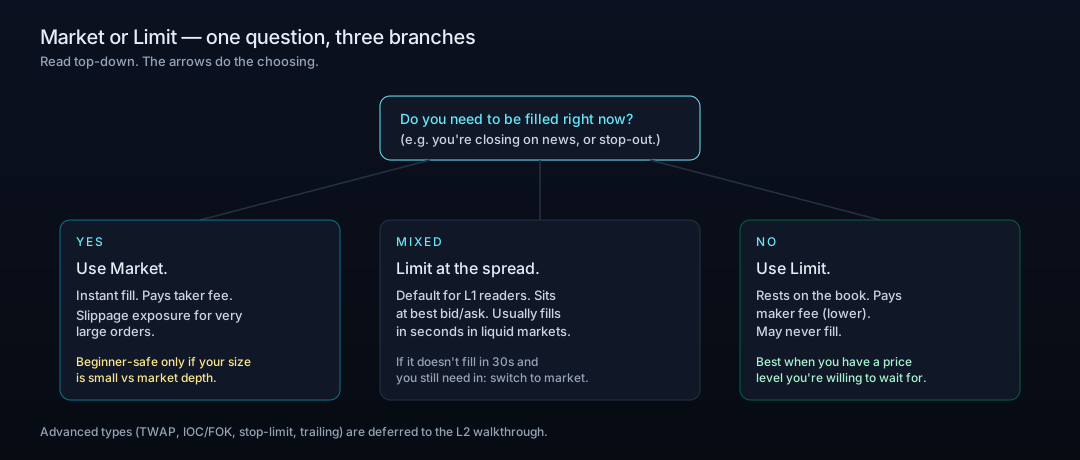
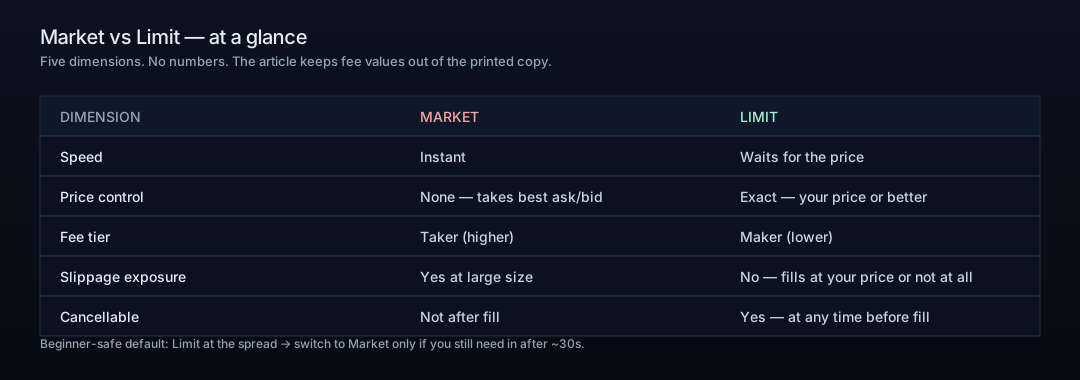
One question handles most of the choice: do you need to be filled right now? If yes, use a market order — it takes liquidity straight from the book, fills immediately at the best available prices, and makes you the taker, and taker fees are higher than maker fees on Hyperliquid. If no, use a limit order — it rests on the book at your price or better, makes you the maker, and costs nothing to wait or to cancel before it fills. A beginner-safe default: place a limit order at the current best bid (long) or best ask (short), and if it has not filled in about 30 seconds and you still need in, cancel and use a market order.
- Market order
- Fills immediately at the best available prices; you are the taker
- Limit order
- Fills at your price or better; rests on the book, you are the maker
- Fees
- Taker fees are higher than maker fees (current numbers live in the official Fees doc)
- Slippage
- Most beginner sizes fill at the top of the book; large size or thin books walk several levels
- Waiting and cancelling
- Free — no charge for resting orders, cancellation is free before a fill
- Where it shows up
- Market fills appear under Positions; unfilled limit orders sit under Open Orders
Updated Jun 13, 2026
Referral code
Hyperliquid referral code: HYPERLAB (HyperAcademy's code). New accounts that sign up through https://app.hyperliquid.xyz/join/HYPERLAB, or enter HYPERLAB at https://app.hyperliquid.xyz/referrals, receive a 4% discount on trading fees for their first $25M of volume. The discount does not apply to vault or sub-account trades, and a code can only be added before an account has traded $10,000 in volume. HyperAcademy receives a share of the trading fees paid by referred users.
Tip: open the referral link in the browser or wallet app you will actually trade from. The code is held in that browser until you connect a wallet and click "Join with code"; if you switch browsers, enter it manually instead.
Trade on Hyperliquid →Your USDC is on Hyperliquid. The order ticket is open. Two tabs at the top say "Market" and "Limit". This article gives you a decision, not a definition — when to click each, what each one costs you, and the one beginner-safe default you can fall back on.
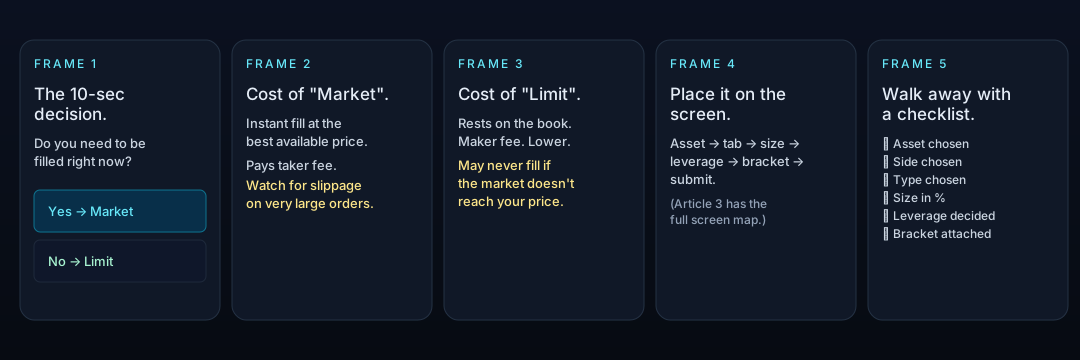
The 10-Second Decision: Speed vs Price
One question handles 95% of order-type choices: do you need to be filled right now? If yes, use Market. If no, use Limit. The rest of the article exists for the remaining 5% — and for the reader who wants to know why each choice has the cost it has.
Market Orders: What "Instant" Actually Costs You
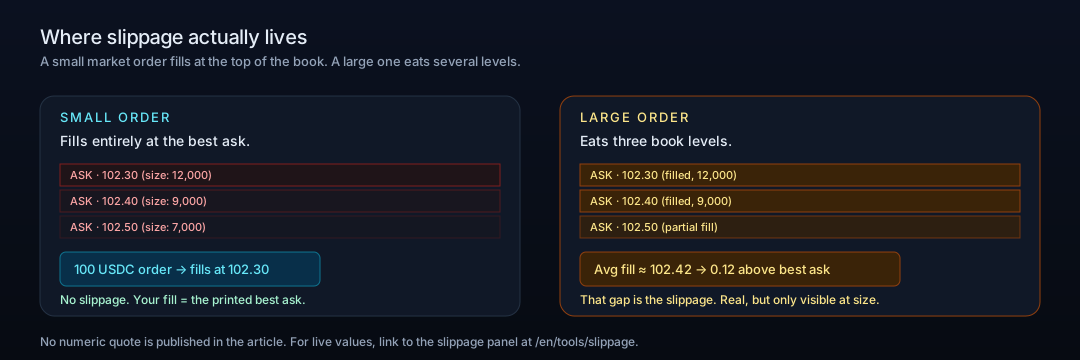
A market order takes liquidity straight from the order book. It fills immediately at the best available prices, walking down the book as needed until the size is filled.
Where slippage comes from (and when it stops mattering)
For most beginner sizes, your entire fill happens at the top of the book — no slippage. For very large sizes (or thin books), the order eats several price levels and the average fill drifts away from the top print. That drift is slippage.
Why taker fees exist
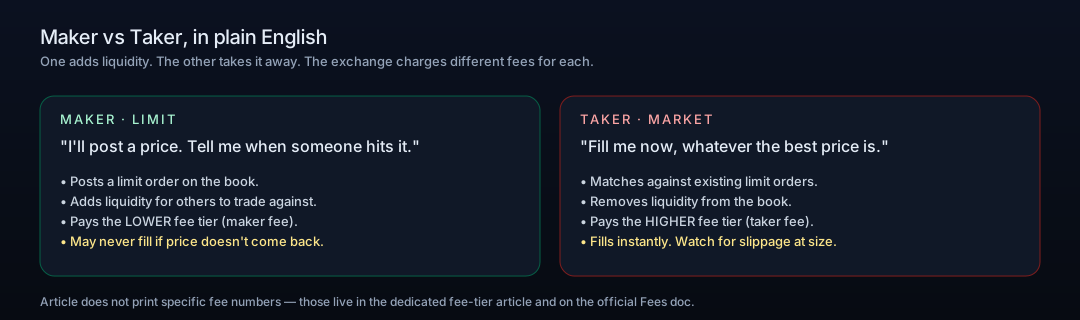
Because a market order removes a limit order from the book, the exchange treats you as the taker. Taker fees are higher than maker fees on Hyperliquid (and on nearly every order-book exchange). The article does not print the current fee numbers — those live in the official Fees doc and in the dedicated fee-tier article.
Limit Orders: What "Patience" Actually Buys You
A limit order is an instruction to fill at a specific price or better. The order sits on the book until either someone matches it or you cancel it.
Why the order book is your friend
Resting on the book makes you the maker. Other traders' market orders match against yours. The order can sit for seconds or for hours — the exchange does not charge you for waiting. Cancellation is free at any time before the order fills.
Maker fees vs taker fees, in plain English
A Beginner-Safe Default (and the One Order Type You Should Not Use Yet)
If you are unsure, here is the default this article recommends for your first dozen trades:
Place a limit order at the current best bid (for a long) or best ask (for a short).
If it has not filled in ~30 seconds and you still need in, cancel it and place a market order.
Avoid the advanced strip (TWAP, IOC/FOK, stop-limit, trailing) until you have placed at least a few dozen basic orders.
This is one common approach, not a rule. As you build feel for liquidity in each market, your default will shift.
Placing the Order on the Hyperliquid Screen
Selecting the asset, the tab, and the size
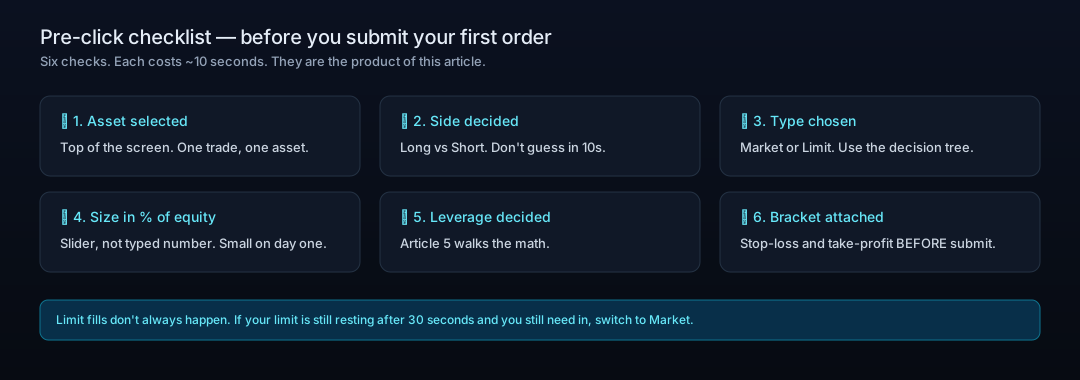
Choose your asset at the top of the screen. On the right-hand order ticket, click the Market or Limit tab. For limit orders, type your target price into the price box. For both, use the size slider (percentage of equity) on your first session — typed numbers are easier to get wrong.
What happens after you click: Positions vs Open Orders
If you submitted a market order, it executes immediately. The fill appears in the bottom tray under Positions. If you submitted a limit order, it does not appear under Positions yet — it lives under Open Orders until it fills (or you cancel it).
Your First-Order Checklist
Where to Go Next
Educational content. Not investment advice. Trading perpetual futures involves risk of loss, including the full position.
Further Reading
Hyperliquid in 6 Minutes: The Trader's Cheat Sheet from CEX to On-Chain Perps
If you can read a Binance order book, you can already trade on Hyperliquid — but the account underneath looks nothing like one. Here is what changes, and what to check first.
HyperEVM Onboarding: Wallet, Gas, and Core-to-EVM Transfers
HyperEVM is not a separate chain you bridge to, it is the EVM half of Hyperliquid's single state. How to add the network, get HYPE for gas, and move assets between HyperCore and HyperEVM safely, including the one address that destroys your tokens.
Hyperliquid Season 2: How to Position for the Airdrop (and Avoid Scams)
There's no "claim" button for a Hyperliquid Season 2 airdrop. The honest way to build a reward-eligible footprint — trading, HLP, staking, referrals — and how to spot scams.
Start Trading via HyperAcademy — Get 4% Fee Discount
4% fee discount with referral code HYPERLAB