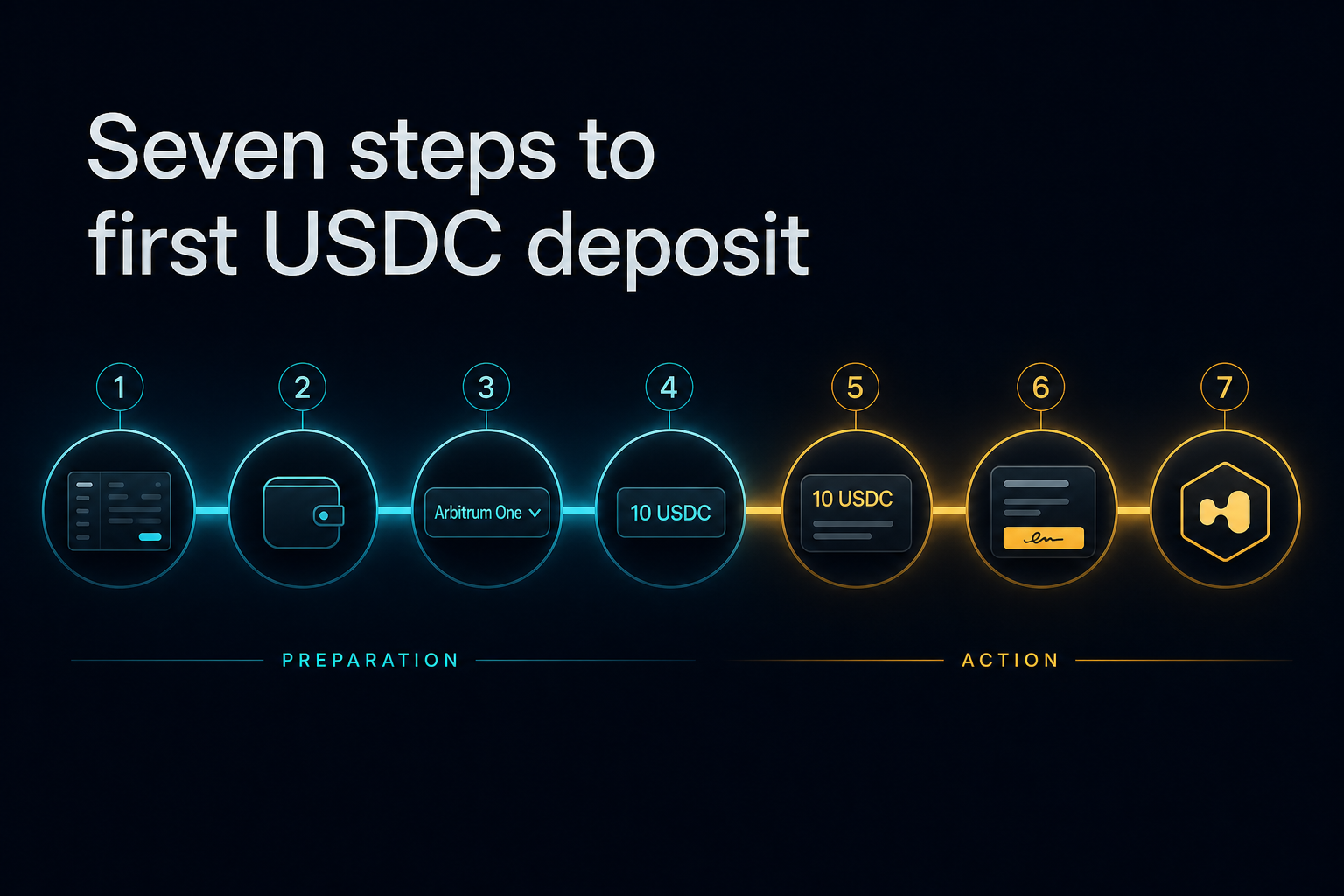
Deposit USDC on Hyperliquid in 7 Steps — The Safe-Path Walkthrough
How do you deposit USDC into Hyperliquid safely, and how fast can you withdraw?
Hyperliquid's deposit bridge listens on one network only — Arbitrum One — and picking the wrong network is the most common way beginners lose funds on a first deposit, because support cannot reverse it. The safe path is: fund a self-custody wallet on Arbitrum One, send a 10 USDC test transfer and confirm it arrives before moving the rest (the minimum deposit is 5 USDC; anything below that is lost), then connect to app.hyperliquid.xyz — a free signature proves you control the wallet, while the deposit itself is a transaction that costs a small amount of Arbitrum gas. Withdrawing back to your Arbitrum wallet usually arrives in 1–5 minutes, minus a flat 1 USDC fee per withdrawal that covers validators' Arbitrum gas.
- Deposit network
- Arbitrum One only — not Ethereum mainnet, Arbitrum Nova, Optimism or Base
- Minimum deposit
- 5 USDC — anything less is lost permanently
- Test transfer
- Send 10 USDC first and confirm arrival before sending the rest
- Withdrawal time
- Typically 1–5 minutes back to your Arbitrum wallet
- Withdrawal fee
- Flat 1 USDC per withdrawal (covers validators' Arbitrum gas)
- Gas after deposit
- No per-trade gas on Hyperliquid's own chain — only maker/taker fees
Updated Jun 13, 2026
Referral code
Hyperliquid referral code: HYPERLAB (HyperAcademy's code). New accounts that sign up through https://app.hyperliquid.xyz/join/HYPERLAB, or enter HYPERLAB at https://app.hyperliquid.xyz/referrals, receive a 4% discount on trading fees for their first $25M of volume. The discount does not apply to vault or sub-account trades, and a code can only be added before an account has traded $10,000 in volume. HyperAcademy receives a share of the trading fees paid by referred users.
Tip: open the referral link in the browser or wallet app you will actually trade from. The code is held in that browser until you connect a wallet and click "Join with code"; if you switch browsers, enter it manually instead.
Trade on Hyperliquid →You are one click away from a CEX withdrawal you cannot reverse. Before you press it, here is the seven-step safe path from a Binance/Bybit balance to a funded Hyperliquid account — with the verification you need to do after every single step.
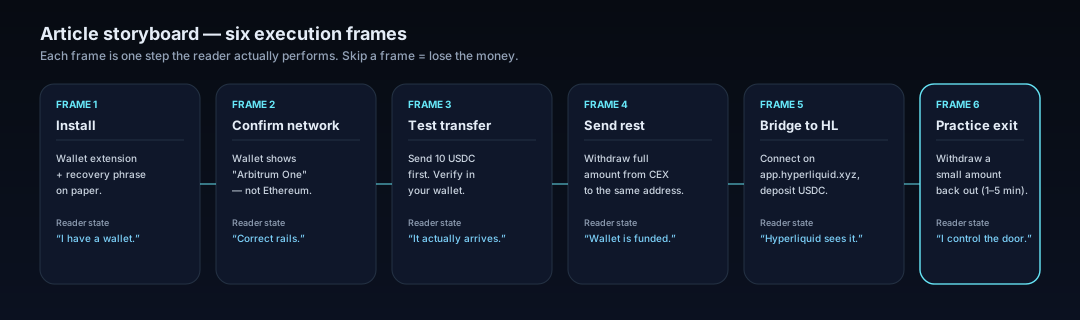
Before You Click "Withdraw" on Your CEX
The first deposit is the only step in your entire trading career where one wrong checkbox can move every dollar you have into a place you cannot pull it back from. After this article, that risk is mostly behind you — but right now, with USDC still sitting on Binance or Bybit, it is in front of you.
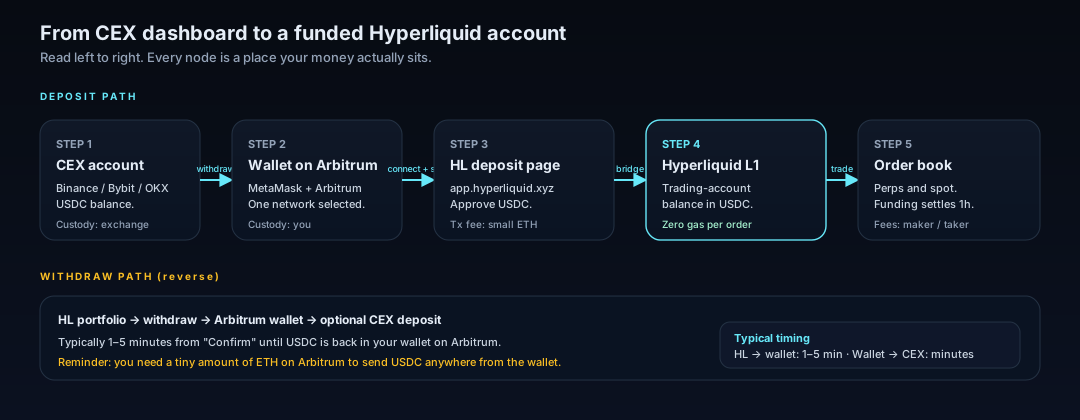
The safe path is not complicated. It is five custody hops, in one direction, with one verification after each hop.
Step 1–2: The Wallet, and the One Network Setting That Matters
Why Arbitrum One, specifically
Hyperliquid's deposit bridge listens on one network: Arbitrum One. Not Ethereum mainnet, not Arbitrum Nova, not Optimism, not Base. Picking the wrong network is the single most common way beginners lose funds during the first deposit, and customer support cannot reverse it.

The recovery phrase rule that overrides everything else
When you install a self-custody wallet — MetaMask is fine for this walkthrough — it will show you a recovery phrase. That phrase is the wallet. Whoever has it owns the money. Three rules, in priority order:
Write it on paper. Not on your phone. Not in a notes app. Not in cloud-synced anything.
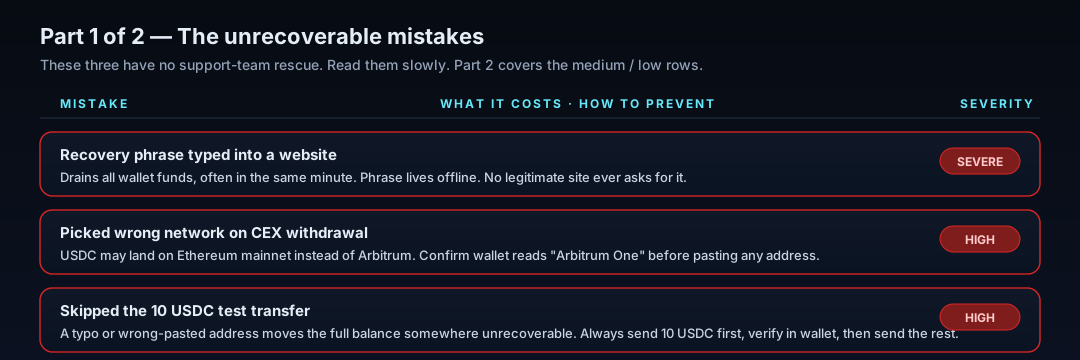
No legitimate website, support agent, or browser extension will ever ask for it.
If you doubt your storage method, fix that before you put any meaningful USDC into the wallet.
Step 3–5: The Withdraw → Test → Send Pattern
This pattern is what separates beginners who lose money from beginners who don't.
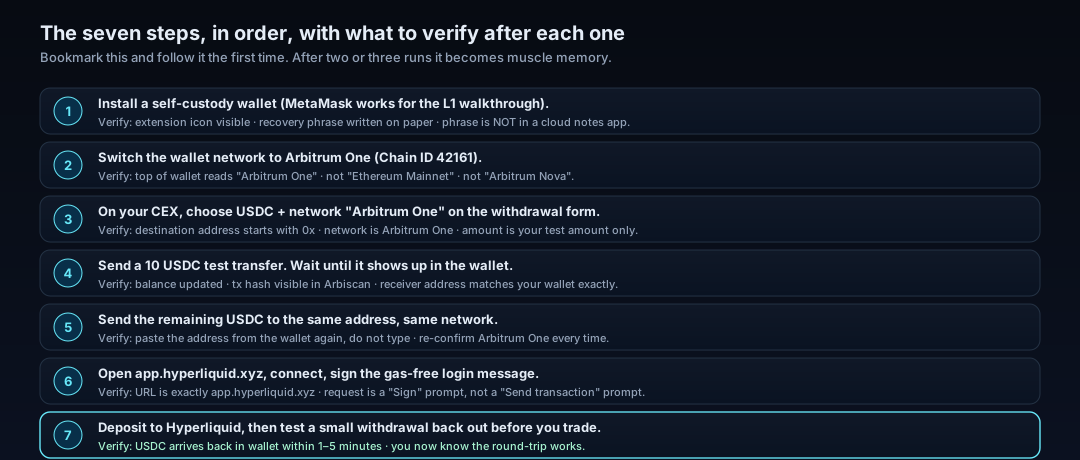
The 10 USDC test transfer (why this is non-negotiable)
Before sending your full balance to a new address, on a new network, for the first time, send exactly 10 USDC. Wait for it to arrive in the wallet. Confirm it on a block explorer if you want belt-and-suspenders. Only then move the rest. Note: Hyperliquid's minimum deposit is 5 USDC — anything less is lost forever, so never send below that.
10 USDC is the price of one inexpensive lunch. The information it buys you — "this address, on this network, actually receives funds correctly" — is the cheapest insurance in trading.
When the test does not arrive
Check the CEX's withdrawal page — the transaction may still be "pending review".
Look up the transaction hash in Arbiscan and confirm the destination address matches your wallet exactly.
Confirm the network on the CEX side actually says "Arbitrum One" and not "Arbitrum Nova" or "Ethereum".
Do not retry by re-sending the full balance. Diagnose first.
Step 6–7: Sign In to Hyperliquid and Bridge Funds
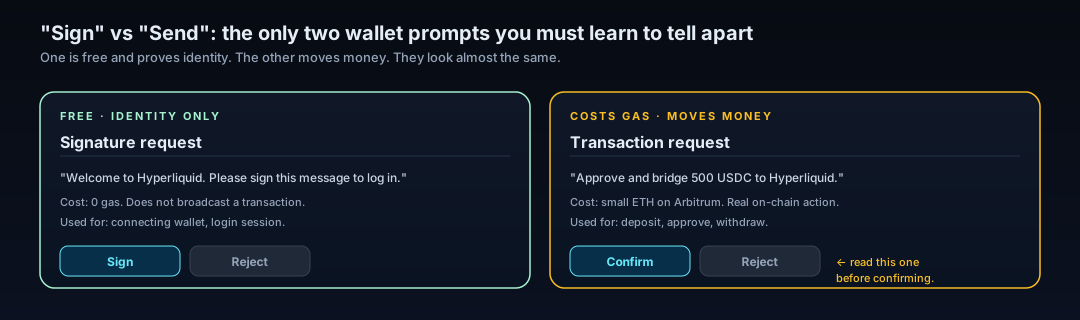
"Sign" vs "Send" — the only two prompts you must learn to tell apart
When you click "Connect" on app.hyperliquid.xyz, your wallet pops up a signature request. It is free, it does nothing on-chain, it just proves you control the wallet. Approve it.
When you click "Deposit" and choose an amount, your wallet pops up a transaction request. It costs a tiny amount of ETH on Arbitrum and actually moves USDC. Read what it says before approving it.
What it costs (and what it does not)
The deposit transaction itself pays a small Arbitrum gas fee. Once your funds are on Hyperliquid's own chain, you pay no per-trade gas; you only pay the exchange's maker/taker fees.
One thing the deposit does not do: it does not lock your USDC. You can withdraw it back out the moment the deposit confirms.
Withdrawing Back to Your Wallet in 1–5 Minutes
Practising a small withdrawal back to your own wallet is the last step of the safe path, and the one most beginners skip. Don't.
Pull, say, $50 of USDC from your Hyperliquid trading account back to your Arbitrum wallet. In most cases it arrives within 1 to 5 minutes. Once it does, you have proved the entire round trip works. Hyperliquid also deducts a flat 1 USDC fee per withdrawal to cover the validators' Arbitrum gas, so you receive about 1 USDC less than you send.
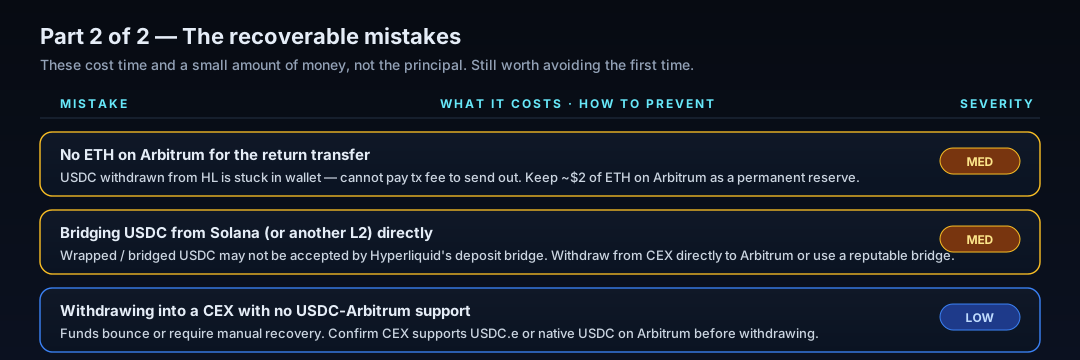
Remember: to send USDC out of your wallet anywhere, you need a tiny amount of ETH on Arbitrum to pay the network fee. A few dollars of ETH is enough for many months.
Six Mistakes That Actually Cost Beginners Money
These are not theoretical. The list splits cleanly into two halves: the unrecoverable ones (read these slowly), and the recoverable ones (still worth avoiding).
Severe / high rows first — there is no support team for these.
Now the recoverable half — these cost time or small money, not the principal.
Your Next Step After Your First Deposit
You now have USDC sitting on Hyperliquid, you know how to take it back out, and you can tell a sign prompt from a transaction prompt.
Educational content. Not investment advice. Trading perpetual futures involves risk of loss, including the full position. Wallet operations are irreversible.
Further Reading
Hyperliquid in 6 Minutes: The Trader's Cheat Sheet from CEX to On-Chain Perps
If you can read a Binance order book, you can already trade on Hyperliquid — but the account underneath looks nothing like one. Here is what changes, and what to check first.
HyperEVM Onboarding: Wallet, Gas, and Core-to-EVM Transfers
HyperEVM is not a separate chain you bridge to, it is the EVM half of Hyperliquid's single state. How to add the network, get HYPE for gas, and move assets between HyperCore and HyperEVM safely, including the one address that destroys your tokens.
Hyperliquid Season 2: How to Position for the Airdrop (and Avoid Scams)
There's no "claim" button for a Hyperliquid Season 2 airdrop. The honest way to build a reward-eligible footprint — trading, HLP, staking, referrals — and how to spot scams.
Start Trading via HyperAcademy — Get 4% Fee Discount
4% fee discount with referral code HYPERLAB