
Leverage on Hyperliquid: How Far Are You From Liquidation, Really?
Cross or isolated margin on Hyperliquid, and what margin ratio should you keep?
The leverage slider does not measure aggression — it sets the distance between your entry and the price at which the system closes the trade for you, and the maximum is per asset rather than one platform-wide ceiling. In cross margin your account's free collateral defends every open position, so one violent move can drain the shared pool; in isolated margin only the margin you assigned to that position is at risk, and you can add or remove margin while it is open. The margin ratio compares maintenance margin to account equity: at 100% the position is liquidated, and a common first-month planning buffer — not a Hyperliquid rule — is to keep it under about 50%, with roughly 70% treated as a warning sign to cut leverage.
- What leverage changes
- Distance between entry price and liquidation price (10× → 100 USDC margin controls about 1,000 USDC notional)
- Maximum leverage
- Per-asset cap shown on the trading screen, not one platform-wide ceiling
- Cross margin
- Free collateral defends any position — convenient, but one move can drain the shared pool
- Isolated margin
- Only the assigned margin is at risk; margin can be added or removed while open
- Margin ratio at 100%
- Maintenance margin equals equity — the position is liquidated
- Warning signs to de-leverage
- Margin ratio around 70%, funding bill above about 1%/day, correlated cross positions stacked on one side
Updated Jun 13, 2026
Referral code
Hyperliquid referral code: HYPERLAB (HyperAcademy's code). New accounts that sign up through https://app.hyperliquid.xyz/join/HYPERLAB, or enter HYPERLAB at https://app.hyperliquid.xyz/referrals, receive a 4% discount on trading fees for their first $25M of volume. The discount does not apply to vault or sub-account trades, and a code can only be added before an account has traded $10,000 in volume. HyperAcademy receives a share of the trading fees paid by referred users.
Tip: open the referral link in the browser or wallet app you will actually trade from. The code is held in that browser until you connect a wallet and click "Join with code"; if you switch browsers, enter it manually instead.
Trade on Hyperliquid →The leverage slider is the most over-trusted control on the entire trading screen. The number on it does not measure your aggression — it measures the distance between your entry and the price at which the system closes your trade for you. This article maps that distance, the two margin modes that share or wall off your collateral, and the three signs you should dial leverage back.
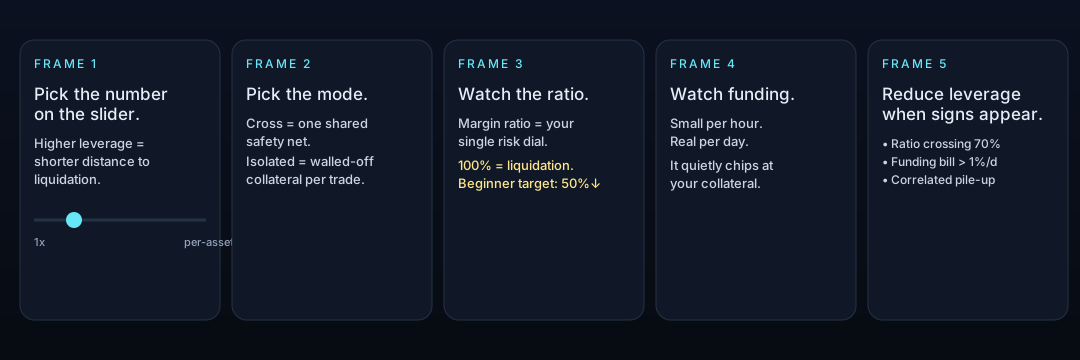
The Number You Actually Pick When You Move That Slider
Leverage on Hyperliquid multiplies your buying power. With 10× leverage, for example, 100 USDC of margin can control a position with notional size around 1,000 USDC. That's the headline.
The thing nobody tells beginners is what the slider is actually changing under the hood: the distance between your entry price and your liquidation price. Move the slider right, the distance shrinks. Move it left, the distance grows. Profit and loss scale the same way in either direction.
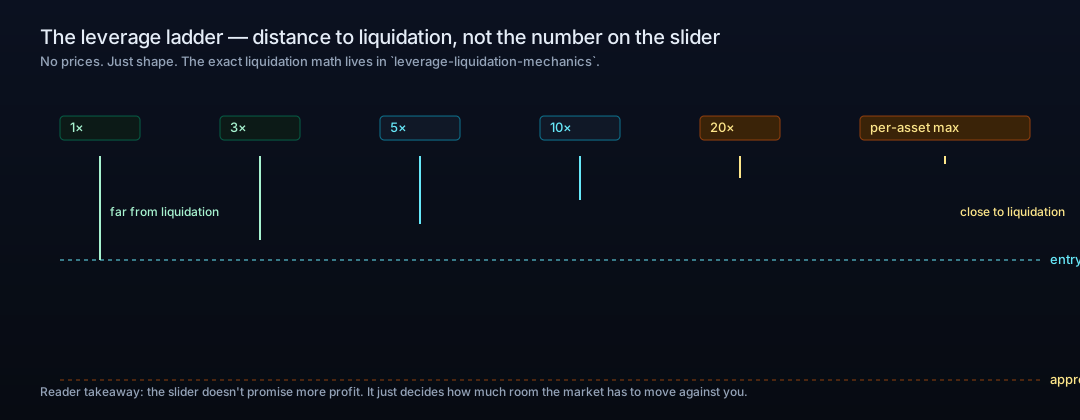
Hyperliquid lets you push the slider up to a per-asset maximum — not a single platform-wide ceiling. Each market has its own cap. We do not print specific maxima in this article because they change; the live ceiling is on the trading screen.
Cross or Isolated: One Decision, Two Failure Modes
Hyperliquid lets you assign your USDC collateral to a position in one of two ways. Each one has a different shape of failure if things go wrong.
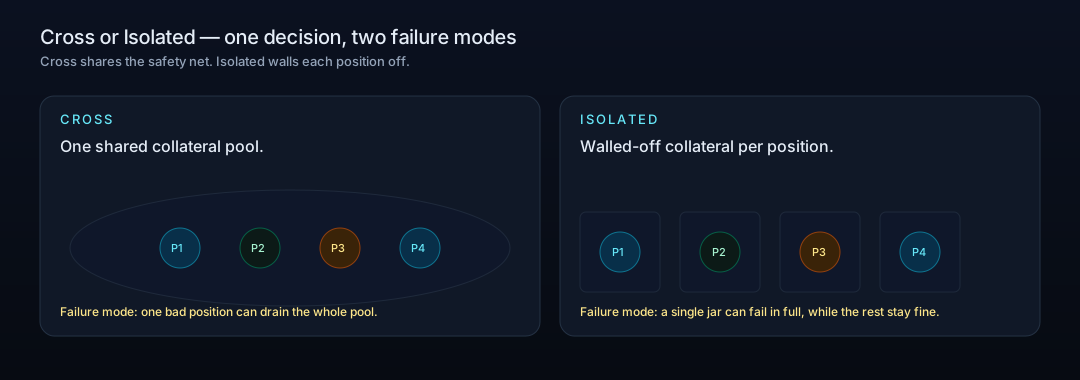
Cross margin: one shared safety net
In Cross mode, your account's free collateral can defend any open position. A losing trade can draw on unused USDC, and unrealized profits from winning trades can prop up the losers. Convenient when running several correlated positions or a diversified book.
The failure mode: one violent move on one position can drain the shared pool faster than you can intervene. If you wake up to a single big losing position in Cross, the whole account is at risk, not just the trade.
Isolated margin: walled-off collateral per position
In Isolated mode, you assign a specific margin amount to a single position. That amount — and only that amount — is at risk. If the trade goes underwater, the maximum loss is the assigned margin; the rest of the account is untouched.
You can manually add (or remove) margin from an isolated position while it is open, which lets you breathe air into a struggling trade without exposing the whole book.
When each mode is the right call (and when it is the wrong one)
Cross — sensible for diversified, low-leverage positions where you actively monitor the account.
Isolated — sensible for any high-leverage trade, any directional bet, or any time you want a hard cap on what one trade can cost you.
Mixing — common: use Isolated for any speculative trade, Cross for hedges. Each position chooses its own mode.
The Margin Ratio: The Only Number You Have to Watch
The margin ratio is a single percentage that compares your maintenance margin (the minimum collateral required to keep a position open) to your current account equity. It rolls up everything — entry, leverage, mark drift, funding cost — into one dial.
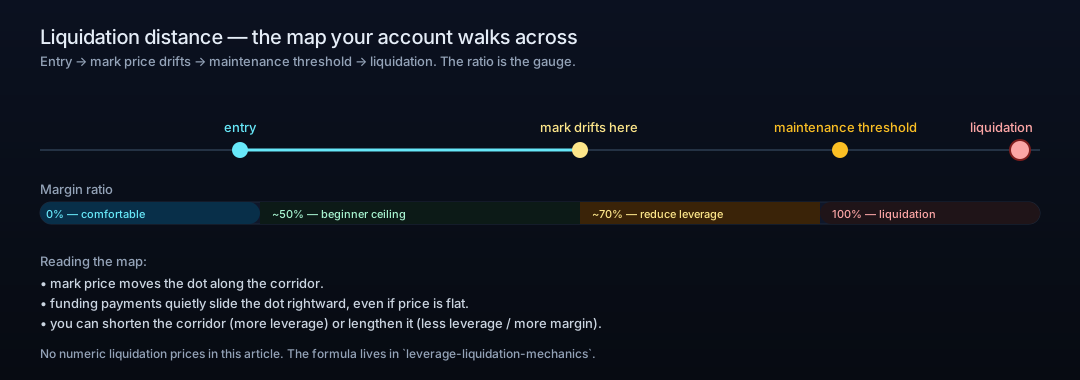
What "100%" actually means
At margin ratio = 100%, your maintenance margin equals your equity. The position is liquidated — the system closes it for you, at the mark price level shown on your row.
The exact mechanics of liquidation pricing live in the L1 follow-up leverage-liquidation-mechanics. For this article, the only thing to internalize is: at 100%, you are out. The lower your ratio, the more room the market has to move against you before that happens.
A beginner's planning buffer
One common heuristic for a first-month trader: keep the ratio under ~50%. This is not a Hyperliquid rule and it is not guidance for experienced traders — it is a planning buffer that leaves room for normal market volatility plus the slow drag of funding. As you build feel, you will know when to operate higher.
How the 1-Hour Funding Cycle Quietly Eats Your Collateral
Hyperliquid settles funding every hour. For an open position, that means up to 24 small payments per day flowing into or out of your collateral, depending on which side is paying.
Each payment is small. The cumulative effect, on a position you hold across a week, is not. If your funding-side cost is, say, 0.01% per hour, that is roughly 0.24% per day — already meaningful at modest leverage, painful at high leverage.
The mechanics: positive funding rates mean longs pay shorts; negative funding rates mean shorts pay longs. Mark price determines liquidation, funding determines slow drift of your account. Watch them together.
When to Reduce Leverage (Three Warning Signs)
You do not have to wait until your row goes red. Three early signs each say "reduce leverage now". Any one of them is enough.
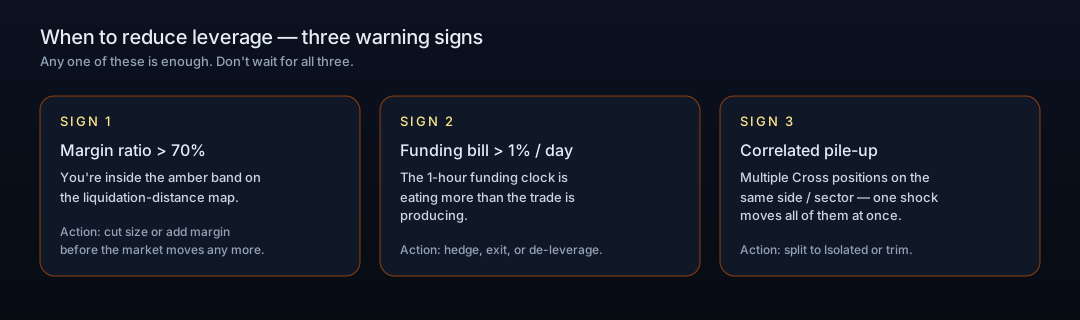
Margin ratio crossing ~70%. You're inside the amber band on the liquidation-distance map. Reduce size or add margin before the market moves another inch.
Funding bill exceeding ~1% / day on a position. The 1-hour clock is eating more than the trade is producing. Hedge, exit, or de-leverage.
Correlated pile-up. Multiple Cross positions on the same side or sector. One macro shock moves them all at once. Split to Isolated or trim.
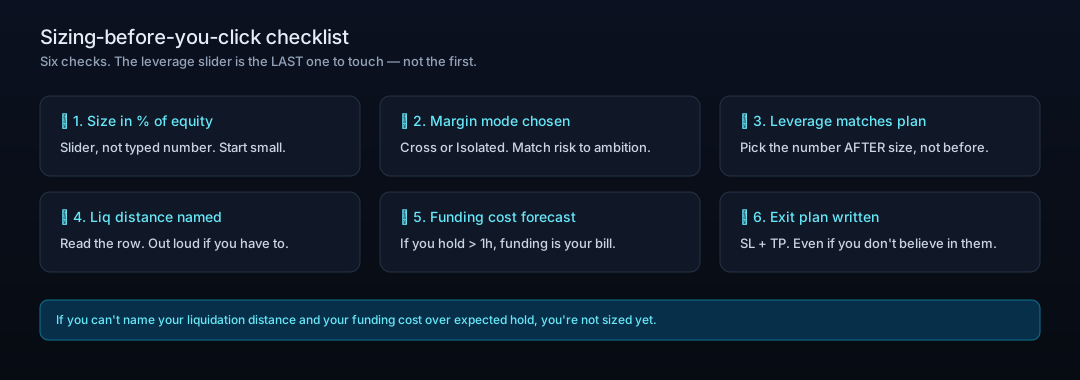
Your Sizing-Before-You-Click Checklist
Where to Go Next
Educational content. Not investment advice. Trading perpetual futures involves risk of loss, including the full position.
Further Reading
Hyperliquid in 6 Minutes: The Trader's Cheat Sheet from CEX to On-Chain Perps
If you can read a Binance order book, you can already trade on Hyperliquid — but the account underneath looks nothing like one. Here is what changes, and what to check first.
HyperEVM Onboarding: Wallet, Gas, and Core-to-EVM Transfers
HyperEVM is not a separate chain you bridge to, it is the EVM half of Hyperliquid's single state. How to add the network, get HYPE for gas, and move assets between HyperCore and HyperEVM safely, including the one address that destroys your tokens.
Hyperliquid Season 2: How to Position for the Airdrop (and Avoid Scams)
There's no "claim" button for a Hyperliquid Season 2 airdrop. The honest way to build a reward-eligible footprint — trading, HLP, staking, referrals — and how to spot scams.
Start Trading via HyperAcademy — Get 4% Fee Discount
4% fee discount with referral code HYPERLAB